Wingman
From CKRAS Wiki
 |
Wingman (CS2)Play 2v2 Wingman matches on your CKRAS CS2 server with the correct competitive settings.
|
CKRAS supports the game mode Wingman / Scrim Competitive for CS2. With additional addons like MatchZy, you can run Wingman matches with optimized settings directly on your server.
Jump to: Quick Setup • How it Works • Requirements
Quick Setup
Start Wingman in a few clicks:
- Open your server in the webpanel
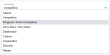
- Select Wingman / Scrim Competitive
- Restart the server
- Join and start playing

How it Works
Wingman mode in CS2 is a fast-paced 2v2 game mode with 90-second rounds and compact competitive gameplay.
CKRAS adjusts the configuration so you can play 2v2 with the correct settings.
MatchZy Support
Recommended: Use MatchZy for the best Wingman / Scrim experience.
We modified our configs so that Wingman can be played with the proper setup together with MatchZy.
Requirements
CS2 Wingman / Scrim Competitive MatchZy Webinterface
