MatchZy: Difference between revisions
No edit summary Tag: Reverted |
|||
| Line 1: | Line 1: | ||
|- | |- | ||
| !clearrec | |||
| !clearrec | |||
| Deletes the current recorded path. | | Deletes the current recorded path. | ||
|- | |- | ||
|!settrigger | |!settrigger | ||
|Set a zone at your feet and walk into it later to start the playback! | |Set a zone at your feet and walk into it later to start the playback! | ||
|- | |- | ||
|!showpatch | |!showpatch | ||
|Toggles colored visual lines for recorded bot movements and start-markers. | |Toggles colored visual lines for recorded bot movements and start-markers. | ||
|- | |- | ||
|!loadplay <name | |!loadplay <name> | ||
|Loads a previously saved path by name (includes smart-matching). | |Loads a previously saved path by name (includes smart-matching). | ||
|- | |- | ||
| !listplays | | !listplays | ||
| Shows all recordings (both the 5-slot temporary buffer and permanent saved plays). | | Shows all recordings (both the 5-slot temporary buffer and permanent saved plays). | ||
|- | |- | ||
| !delplay <name> | | !delplay <name> | ||
| Deletes a saved path recording. | | Deletes a saved path recording. | ||
|- | |- | ||
|!hud | |!hud | ||
|Toggle center-screen HUD and visual menus (Practice status/Help Dashboard) for a cleaner UI. | |Toggle center-screen HUD and visual menus (Practice status/Help Dashboard) for a cleaner UI. | ||
|} | |} | ||
| Line 244: | Line 43: | ||
| !last || Teleports you to the last thrown grenade position. | | !last || Teleports you to the last thrown grenade position. | ||
|- | |- | ||
| !back <nr> || Teleports you back in your grenade history. <code>!back</code> without number teleports you to last position | | !back <nr> || Teleports you back in your grenade history. <code>!back</code> without number teleports you to last position | ||
|- | |- | ||
| !delay <sek> || Sets a delay for Rethrow/Index commands. | | !delay <sek> || Sets a delay for Rethrow/Index commands. | ||
| Line 252: | Line 51: | ||
| !lastindex || Prints the index number of your last thrown grenade. | | !lastindex || Prints the index number of your last thrown grenade. | ||
|- | |- | ||
|!resetnade / !resetnades | |!resetnade / !resetnades | ||
|Command to reset grenade history in Practice Mode | |Command to reset grenade history in Practice Mode | ||
|- | |- | ||
|!autogo | |!autogo | ||
|Teleports you to the landing position of your thrown smoke or molotov | |Teleports you to the landing position of your thrown smoke or molotov | ||
|- | |- | ||
|!goto | |!goto | ||
|Teleport to a specific position index in grenade history. | |Teleport to a specific position index in grenade history. | ||
|- | |- | ||
|!drop | |!drop | ||
|Drops the player to the ground, fixing potential stuck-in-air issues after noclip. | |Drops the player to the ground, fixing potential stuck-in-air issues after noclip. | ||
|- | |- | ||
| Line 308: | Line 107: | ||
| !prac / !tactics || Starts practice mode. | | !prac / !tactics || Starts practice mode. | ||
|- | |- | ||
| !exit / !exitprac || Exits practice mode + | | !exit / !exitprac || Exits practice mode + reset the current match state (warmup) even during a live game | ||
|- | |- | ||
| !map <name> || Switches the map (e.g., <code>!map de_inferno</code>). | | !map <name> || Switches the map (e.g., <code>!map de_inferno</code>). | ||
|- | |- | ||
|!dm / !deathmatch | |!dm / !deathmatch | ||
|toggles deathmatch mode during warmup on and off, see [[MatchZy#MatchZy Options|options]] | |toggles deathmatch mode during warmup on and off, see [[MatchZy#MatchZy Options|options]] | ||
|- | |- | ||
| Line 323: | Line 122: | ||
| !rcon <command> || Sends RCON commands to the server. (alternative via console css_rcon <cmd> | | !rcon <command> || Sends RCON commands to the server. (alternative via console css_rcon <cmd> | ||
|- | |- | ||
| !roundknife / !rk / !knife | | !roundknife / !rk / !knife || Toggles knife round. | ||
|- | |- | ||
| !playout / !clinch | | !playout / !clinch || Toggles playout (match continues after winner is decided). | ||
|- | |- | ||
|!overtime / !ot | |!overtime / !ot | ||
|Toggles overtime for the match. Overtime is enabled by default in live.cfg. | |Toggles overtime for the match. Overtime is enabled by default in live.cfg. | ||
|- | |- | ||
| Line 341: | Line 140: | ||
|- | |- | ||
| !readyrequired <num> || Sets the number of ready players required to start. | | !readyrequired <num> || Sets the number of ready players required to start. | ||
|- | |||
| !addreadytime <seconds> <code>new</code> || Adds time to the active ready-up or veto countdown. Requires the <code>@css/map</code> admin permission. | |||
|- | |- | ||
| !settings || Displays the current server settings. | | !settings || Displays the current server settings. | ||
Revision as of 22:06, 3 October 2026
|- | !clearrec | Deletes the current recorded path. |- |!settrigger |Set a zone at your feet and walk into it later to start the playback! |- |!showpatch |Toggles colored visual lines for recorded bot movements and start-markers. |- |!loadplay <name> |Loads a previously saved path by name (includes smart-matching). |- | !listplays | Shows all recordings (both the 5-slot temporary buffer and permanent saved plays). |- | !delplay <name> | Deletes a saved path recording. |- |!hud |Toggle center-screen HUD and visual menus (Practice status/Help Dashboard) for a cleaner UI. |}
Nade Tools
| !<cmd> / .<cmd> | Description |
|---|---|
| !throw / !rethrow | Rethrows your last thrown grenade. |
| !rethrowsmoke | Rethrows your last thrown smoke grenade. |
| !rethrownade | Rethrows your last thrown HE grenade. |
| !rethrowflash | Rethrows your last thrown flashbang. |
| !rethrowmolotov | Rethrows your last thrown molotov. |
| !rethrowdecoy | Rethrows your last thrown decoy. |
| !last | Teleports you to the last thrown grenade position. |
| !back <nr> | Teleports you back in your grenade history. !back without number teleports you to last position
|
| !delay <sek> | Sets a delay for Rethrow/Index commands. |
| !throwindex <idx> | Throws grenade(s) from history (Example: !throwindex 1 2).
|
| !lastindex | Prints the index number of your last thrown grenade. |
| !resetnade / !resetnades | Command to reset grenade history in Practice Mode |
| !autogo | Teleports you to the landing position of your thrown smoke or molotov |
| !goto | Teleport to a specific position index in grenade history. |
| !drop | Drops the player to the ground, fixing potential stuck-in-air issues after noclip. |
| !clear | Clears active smokes, molotovs and incendiaries. |
| !traj / !pip | Toggle grenade trajectories and preview window. |
| !noflash / !noblind | Toggles flashbang immunity. |
| !nade / !nades | Displays the nade menu (requires CKRAS BOT). |
| !savepos / !loadpos | Saves or loads your current position. |
| !timer | Starts/stops a movement or smoke timer. |
| !savenade / !sn | Saves a lineup permanently. |
| !loadnade / !ln | Loads a saved lineup. |
| !delnade / !dn | Deletes a saved lineup. |
| !importnade / !in | Imports a lineup from a code. |
| !listnades / !lin | Lists saved lineups (optional filter). |
---
Admin Commands
Admin required. See How to become Admin to manage your server.
| !<cmd> / .<cmd> | Description |
|---|---|
| !restart / !rr | Force restarts the match. |
| !start / !force | Force starts a match (Alias: !scrim). |
| !endmatch / !forceend | Force ends a match. (ALies: !exit) |
| !prac / !tactics | Starts practice mode. |
| !exit / !exitprac | Exits practice mode + reset the current match state (warmup) even during a live game |
| !map <name> | Switches the map (e.g., !map de_inferno).
|
| !dm / !deathmatch | toggles deathmatch mode during warmup on and off, see options |
| !forcepause / !fp | Pauses the match as admin (Players cannot unpause). |
| !forceunpause / !fup | Force unpauses the match. |
| !restore <round> | Restore a specific backup round. |
| !rcon <command> | Sends RCON commands to the server. (alternative via console css_rcon <cmd> |
| !roundknife / !rk / !knife | Toggles knife round. |
| !playout / !clinch | Toggles playout (match continues after winner is decided). |
| !overtime / !ot | Toggles overtime for the match. Overtime is enabled by default in live.cfg. |
| !asay <message> | Say as an admin in all chat. |
| !reload_admins | Reloads admins from admins.json. |
| !team1 / !team2 <name> | Sets name for Team 1 or Team 2. |
| !skipveto / !sv | Skips the current veto phase. |
| !whitelist | Toggles whitelisting of players. |
| !readyrequired <num> | Sets the number of ready players required to start. |
!addreadytime <seconds> new |
Adds time to the active ready-up or veto countdown. Requires the @css/map admin permission.
|
| !settings | Displays the current server settings. |
Install MatchZy
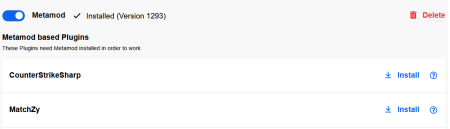
MatchZy requires Metamod. Install Metamod first in the webinterface, then activate CounterStrikeSharp and MatchZy.
Note: MatchZy is preinstalled on all our CS2 gameservers.


MatchZy Options
You can customize settings in the webpanel.

Knife Round Every player is admin Smoke Color Playout Prac / Tactic mode Damage Output Auto Record Autoteleport to Smoke Deathmatch during Warmup
Become Admin
You can become a MatchZy admin by adding yourself in the CKRAS BOT section of your panel.

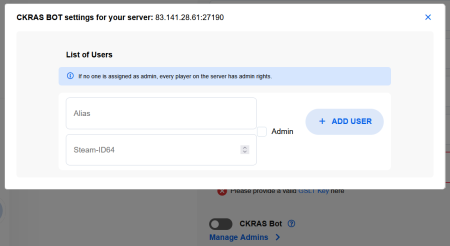
Note: The admin.json can also be edited manually via FTP if needed: /csgo/addons/counterstrikesharp/configs/admins.json
Advanced Configuration
/csgo/cfg/MatchZyContains warmup.cfg, knife.cfg, live.cfg, deathmatch.cfg and prac.cfg.
/csgo/cfg/MatchZy/whitelist.cfgAdd one SteamID64 per line to restrict access.
/csgo/addons/counterstrikesharp/configs/core.jsonChange the global plugin language (DE, EN, FR, etc.).
Support and Recovery
Restore the current round with !stop. Admins use !restore <round>.
bind "KEY" "say !rethrow"bind "KEY" "say !clear"Support: support@ckras.com Join Discord
PreFire | Retakes | Deathmatch
