MatchZy: Difference between revisions
No edit summary |
|||
| (89 intermediate revisions by the same user not shown) | |||
| Line 2: | Line 2: | ||
{{#seo: | {{#seo: | ||
|title=Scrim | |title=Scrim & Practice Plugin for CS2 Gameservers - CKRAS WIKI | ||
|title_mode=append | |title_mode=append | ||
|keywords=ckras | |keywords=ckras, cs2, matchzy, matchzy pro, scrim plugin, practice plugin, cs2 scrim, cs2 practice, cs2 matches, gameserver, nade practice, coach system, bo1, bo3, competitive matches, cs2 server plugin | ||
|description= | |description=MatchZy PRO is a custom extended version of MatchZy used exclusively on CKRAS CS2 servers. It allows you to run scrims, practice sessions and competitive matches with features like coaches, nade practice and automated match control. | ||
|image=MATCHZY - CS2 Plugin.png | |image=MATCHZY - CS2 Plugin.png | ||
|image_alt=MatchZy | |image_alt=MatchZy PRO – CS2 scrim and practice plugin for CKRAS servers | ||
}} | }} | ||
<div class="ck-page"> | <div class="ck-page"> | ||
<div class=" | <div class="ck-hero--dark"> | ||
{| style="background:transparent; border:none; width:100%;" | |||
|- | |||
| style="vertical-align:top; width:130px; padding-right:20px;" | | |||
<div class="ck-hero-logo">[[File:MATCHZY - CS2 Plugin.png|110px|alt=MatchZy - CS2 Plugin|link=MatchZy]]</div> | |||
| style="vertical-align:top;" | | |||
<div class="ck-hero-content"> | |||
<h1 class="ck-hero-title">MatchZy PRO (CKRAS EDITION)</h1> | |||
<div class="ck-hero-sub">MatchZy PRO is an extended and modified version of MatchZy, developed and used exclusively on CKRAS CS2 servers for Practice, PUGs, Scrims, and Matches.</div> | |||
<div class="ck-hero-meta"><b>Quick Start:</b> Type <code>!help</code> or <code>.help</code> in-game to explore commands and guides.</div> | |||
<div class="ck-hero-actions"> | |||
[https://iface.ckras.com <span class="ck-btn ck-btn-primary">▶ Start on CKRAS</span>] | |||
[https://www.ckras.com/en/ <span class="ck-btn ck-btn-ghost">CKRAS Website</span>] | |||
[https://play.ckras.com <span class="ck-btn ck-btn-ghost">Play</span>] | |||
[https://wiki.ckras.com/wiki/index.php?title=MatchZy<span class="ck-btn ck-btn-ghost">Deutsch 🇩🇪</span>] | |||
</div> | |||
</div> | |||
|} | |||
</div> | </div> | ||
<div class="ck-lead"> | <div class="ck-lead"> | ||
'''MatchZy''' is the only addon you need for your [[CS2]] gameserver to run and manage '''Practice, PUGs, Scrims''' (with multiple [[Coach|Coaches]]), and '''Matches''' (supports [[Wingman]]). | '''MatchZy''' is the only addon you need for your '''[[CS2]]''' gameserver to run and manage '''Practice, PUGs, Scrims''' (with multiple [[Coach|Coaches]]), and '''Matches''' (supports [[Wingman]]). | ||
On CKRAS, MatchZy is '''fully integrated''' so you can start right away — including admin management via panel and streamlined in-game usage. | On CKRAS, MatchZy is '''fully integrated''' so you can start right away — including admin management via panel and streamlined in-game usage. | ||
</div> | </div> | ||
<div class="ck-jump"> | <div class="ck-jump"> | ||
<b>Jump to:</b> [[# | <b>Jump to:</b> [[MatchZy#Help & Command Guide System|Help System]] • [[MatchZy#Commands|Commands]] • [[MatchZy#Install MatchZy|Install]] • [[MatchZy#MatchZy Options|Options]] • [[MatchZy#Become Admin|Become Admin]] • [[MatchZy#Support and Recovery|Support]] | ||
</div> | </div> | ||
== Why MatchZy & CKRAS BOT == | |||
With [[CKRAS BOT]] and MatchZy you can easily manage your [[CS2]] gameserver, whether it is a scrim (with [[Coach|coaches]]) or training (<code>!prac</code> / <code>!tactics</code>). You can train and save nade lineups, use <code>!throw</code>, <code>!spawns</code>, <code>!timer</code>, <code>!clear</code>, <code>!fastforward</code> and many more [[MatchZy#Commands|commands]]. | |||
<div class="ck-callout ck-callout--amber"> | |||
<b>Note:</b> MatchZy works fully via in-game commands. You can use <b>!<cmd></b> or <b>.<cmd></b> (e.g., <code>!help</code> or <code>.help</code>). | |||
CKRAS BOT enhances the experience by providing a more convenient help and menu system, easier admin management through the panel, and integration for extended features. | |||
</div> | </div> | ||
--- | == Help & Command Guide System == | ||
<div class="ck-callout"> | |||
<b><code>NEW</code> MatchZy-PRO Help:</b> Use <code>.help prac</code> or <code>!help prac</code> to display practice commands grouped into categories like Positions, Grenades, Bots and Utility. You can also use <code>.help <command></code> or <code>!help <command></code> to get instant help for specific commands directly in-game. | |||
</div> | |||
== | == Commands == | ||
<div class="ck-lead"> | |||
Find all important commands for training, scrims and matches on your [[CS2]] server. | |||
</div> | |||
<div class="ck- | <div class="ck-command-nav"> | ||
[[MatchZy#Custom Commands|Custom Commands]] • [[MatchZy#Practice Mode Commands|Practice Mode Commands]] • [[MatchZy#Admin Commands|Admin Commands]] | |||
</div> | </div> | ||
--- | |||
=== Custom Commands === | |||
= | <div class="ck-callout"> | ||
<b>Use these during normal scrims / matches.</b> | |||
</div> | |||
{| class="wikitable" | {| class="wikitable" | ||
|- | |- | ||
! style="width: | ! style="width: 200px;" | !<cmd> / .<cmd> | ||
! style="width: 600px;" | Description | ! style="width: 600px;" | Description | ||
|- | |- | ||
| !help || Lists the most important available commands. | | !help || Lists the most important available commands. | ||
|- | |- | ||
| !ready || Marks the player ready | | !ready / !r / !rdy || Marks the player ready. | ||
|- | |- | ||
| !unready || Marks the player unready | | !unready / !ur || Marks the player unready. | ||
|- | |- | ||
| ! | | !forceready || Force-readies the player's team (JSON/Get5 setups). | ||
|- | |- | ||
| ! | | !pause / !p || Pauses the match in freezetime. | ||
|- | |- | ||
| ! | | !tech || Pauses the match for technical reasons. | ||
|- | |- | ||
| ! | | !unpause || Requests match unpause (both teams needed). | ||
|- | |- | ||
| | | !stay || Stay on the same side after the knife round. | ||
|- | |- | ||
| ! | | !switch / !swap || Switches the side after the knife round. | ||
|- | |- | ||
| ! | | !stop / !restore || Restores the backup of the current round (both teams needed). | ||
|- | |- | ||
| | | !tac || Starts a tactical timeout. | ||
Example: | |- | ||
| !coach <ct|!coach <side> || Starts coaching the specified side. Example: <code>!coach t</code> | |||
|- | |||
| !uncoach || Removes coach status. | |||
|} | |||
<div class="ck-callout ck-callout--ok"> | |||
<b>Multiple coaches:</b> If you get the message <code>team is full</code>, join the spectator slot or the other team first and then use <code>!coach t</code> or <code>!coach ct</code> to be assigned correctly. | |||
</div> | |||
--- | |||
=== Practice Mode Commands === | |||
<div class="ck-callout"> | |||
<b>Available in practice mode: <code>!prac</code>.</b> Exit with <code>!exit</code>. | |||
</div> | |||
==== Spawns & Positions ==== | |||
{| class="wikitable" | |||
|- | |- | ||
| ! | ! style="width: 200px;" | !<cmd> / .<cmd> | ||
! style="width: 600px;" | Description | |||
|- | |||
| !spawn <nr> || Spawns to the provided competitive spawn number. | |||
|- | |||
| !ctspawn / !tspawn || Spawns to CT or T competitive spawns (Alias: !cts / !ts). | |||
|- | |||
| !bestspawn || Teleports to your team’s closest competitive spawn. | |||
|- | |||
| !worstspawn || Teleports to your team's furthest spawn. | |||
|- | |||
| !bestctspawn / !worstctspawn || Teleports to the closest / furthest CT spawn. | |||
|- | |||
| !besttspawn / !worsttspawn || Teleports to the closest / furthest T spawn. | |||
|- | |||
| !showspawns / !spawns || Shows competitive spawns (Select with "E"). | |||
|- | |||
| !hidespawns || Removes competitive spawn visuals. | |||
|} | |} | ||
==== Bot Control & Movement ==== | |||
{| class="wikitable" | {| class="wikitable" | ||
|- | |- | ||
! style="width: | ! style="width: 200px;" | !<cmd> / .<cmd> | ||
! style="width: 600px;" | Description | ! style="width: 600px;" | Description | ||
|- | |- | ||
|! | | !bot || Adds a bot on your current position. | ||
|- | |- | ||
|! | | !nobots || Removes all bots from the server. | ||
|- | |- | ||
|! | | !cbot / !crouchbot || Adds a crouched bot on your position. | ||
|- | |- | ||
|! | | !boost || Adds a bot and boosts the player on it. | ||
|- | |- | ||
|! | | !crouchboost || Adds a crouched bot and boosts the player. | ||
|- | |- | ||
|! | | !ct / !t / !spec || Changes the player to the requested team. | ||
|- | |- | ||
|! | | !fas / !watchme || Forces all players into spectator except you. | ||
|- | |- | ||
|! | | !god || Turns on god mode. | ||
|- | |- | ||
|! | | !noclip || Activates / deactivates noclip mode. | ||
|- | |- | ||
|! | | !fastforward / !ff || Fast-forwards server time. | ||
|- | |- | ||
|! | | !dryrun / !dry || Turns on dry-run mode. | ||
|- | |- | ||
|!solid|| | | !solid || Toggle solid teammates on/off. | ||
|- | |- | ||
|!impacts|| | | !impacts || Toggle bullet impacts on/off. | ||
|- | |- | ||
|! | | !break || Breaks all breakable entities (glass, vents, etc.) | ||
|} | |||
==== Replay & Path Recording (MatchZy PRO) ==== | |||
<div class="ck-callout ck-callout--amber"> | |||
<b>MatchZy PRO Feature:</b> Record movement paths and replay them using bots to simulate real player behavior. These commands are only available on CKRAS servers. | |||
</div> | |||
{| class="wikitable" | |||
|- | |||
! style="width: 200px;" | Command | |||
! style="width: 600px;" | Description | |||
|- | |||
| !record / !rec <code>new</code> | |||
| Record a movement path. Last 5 paths are kept in a temporary history buffer. | |||
|- | |- | ||
|! | | !play [all/num/name] <code>new</code> | ||
| Plays current path, specific buffer Slot (1-5), or <code>all</code> to play everyone simultaneously for execute training! | |||
|- | |- | ||
|! | | !saveplay [all] <name> <code>new</code> | ||
| Permanently stores the current recording buffer for the active map. Supports single-path recordings as well as multi-path execute recordings. Add <code>all</code> to save the complete scenario. | |||
|- | |- | ||
|! | | !loop / !playloop <code>new</code> | ||
| Enables or disables infinite replay looping. | |||
|- | |- | ||
|! | | !stop <code>new</code> | ||
| Stops active recording or replay (Practice Mode only). | |||
|- | |- | ||
|! | | !clearrec <code>new</code> | ||
| Deletes the current recorded path. | |||
|- | |- | ||
|! | |!settrigger <code>new</code> | ||
|Set a zone at your feet and walk into it later to start the playback! | |||
|- | |- | ||
|! | |!showpatch <code>new</code> | ||
|Toggles colored visual lines for recorded bot movements and start-markers. | |||
|- | |- | ||
|! | |!loadplay <name> <code>new</code> | ||
|Loads a previously saved path by name (includes smart-matching). | |||
|- | |- | ||
|! | | !listplays <code>new</code> | ||
| Shows all recordings (both the 5-slot temporary buffer and permanent saved plays). | |||
|- | |- | ||
|! | | !delplay <name> <code>new</code> | ||
| Deletes a saved path recording. | |||
|- | |- | ||
|! | |!hud <code>new</code> | ||
|Toggle center-screen HUD and visual menus (Practice status/Help Dashboard) for a cleaner UI. | |||
|} | |||
==== Nade Tools ==== | |||
{| class="wikitable" | |||
|- | |- | ||
|! | ! style="width: 200px;" | !<cmd> / .<cmd> | ||
! style="width: 600px;" | Description | |||
|- | |- | ||
|! | | !throw / !rethrow || Rethrows your last thrown grenade. | ||
|- | |- | ||
| | | !rethrowsmoke || Rethrows your last thrown smoke grenade. | ||
|- | |- | ||
| | | !rethrownade || Rethrows your last thrown HE grenade. | ||
|- | |- | ||
|! | | !rethrowflash || Rethrows your last thrown flashbang. | ||
|- | |- | ||
|! | | !rethrowmolotov || Rethrows your last thrown molotov. | ||
|- | |- | ||
|! | | !rethrowdecoy || Rethrows your last thrown decoy. | ||
|- | |- | ||
|! | | !last || Teleports you to the last thrown grenade position. | ||
|- | |- | ||
|! | | !back <nr> || Teleports you back in your grenade history. <code>!back</code> without number teleports you to last position <code>new</code> | ||
|- | |- | ||
|! | | !delay <sek> || Sets a delay for Rethrow/Index commands. | ||
|- | |- | ||
|! | | !throwindex <idx> || Throws grenade(s) from history (Example: <code>!throwindex 1 2</code>). | ||
|- | |- | ||
|! | | !lastindex || Prints the index number of your last thrown grenade. | ||
|- | |- | ||
|! | |!resetnade / !resetnades <code>new</code> | ||
|Command to reset grenade history in Practice Mode | |||
|- | |- | ||
|! | |!autogo <code>new</code> | ||
|Teleports you to the landing position of your thrown smoke or molotov | |||
|- | |- | ||
|! | |!goto <code>new</code> | ||
|Teleport to a specific position index in grenade history. | |||
|- | |- | ||
|! | |!drop <code>new</code> | ||
|Drops the player to the ground, fixing potential stuck-in-air issues after noclip. | |||
|- | |- | ||
|! | | !clear || Clears active smokes, molotovs and incendiaries. | ||
|- | |- | ||
|! | | !traj / !pip || Toggle grenade trajectories and preview window. | ||
|- | |- | ||
|! | | !noflash / !noblind || Toggles flashbang immunity. | ||
| | |||
|- | |- | ||
|! | | !nade / !nades || Displays the nade menu (requires [[CKRAS BOT]]). | ||
|- | |- | ||
|! | | !savepos / !loadpos || Saves or loads your current position. | ||
|- | |- | ||
|! | | !timer || Starts/stops a movement or smoke timer. | ||
|- | |- | ||
|! | | !savenade / !sn || Saves a lineup permanently. | ||
|- | |- | ||
|! | | !loadnade / !ln || Loads a saved lineup. | ||
|- | |- | ||
|! | | !delnade / !dn || Deletes a saved lineup. | ||
|- | |- | ||
|! | | !importnade / !in || Imports a lineup from a code. | ||
|- | |- | ||
|! | | !listnades / !lin || Lists saved lineups (optional filter). | ||
|} | |} | ||
--- | |||
=== | === Admin Commands === | ||
>> [[MatchZy# | |||
<div class="ck-callout ck-callout--amber"> | |||
<b>Admin required.</b> See [[MatchZy#Become Admin|How to become Admin]] to manage your server. | |||
</div> | |||
{| class="wikitable" | {| class="wikitable" | ||
|- | |- | ||
! style="width: | ! style="width: 200px;" | !<cmd> / .<cmd> | ||
! style="width: 600px;" | Description | ! style="width: 600px;" | Description | ||
|- | |- | ||
|!restart||Force restarts | | !restart / !rr || Force restarts the match. | ||
|- | |- | ||
| | | !start / !force || Force starts a match (Alias: !scrim). | ||
|- | |- | ||
|!endmatch||Force | | !endmatch / !forceend || Force ends a match. (ALies: !exit) | ||
|- | |- | ||
|!prac | | !prac / !tactics || Starts practice mode. | ||
|- | |- | ||
|!exitprac|| | | !exit / !exitprac || Exits practice mode + <code>new</code> reset the current match state (warmup) even during a live game | ||
|- | |- | ||
|!map <name>||Switches | | !map <name> || Switches the map (e.g., <code>!map de_inferno</code>). | ||
|- | |- | ||
|! | |!dm / !deathmatch <code>new</code> | ||
|toggles deathmatch mode during warmup on and off, see [[MatchZy#MatchZy Options|options]] | |||
|- | |- | ||
|! | | !forcepause / !fp || Pauses the match as admin (Players cannot unpause). | ||
|- | |- | ||
|! | | !forceunpause / !fup || Force unpauses the match. | ||
|- | |- | ||
|! | | !restore <round> || Restore a specific backup round. | ||
|- | |- | ||
|! | | !rcon <command> || Sends RCON commands to the server. (alternative via console css_rcon <cmd> | ||
|- | |- | ||
|!roundknife | | !roundknife / !rk / !knife <code>new</code>|| Toggles knife round. | ||
|- | |- | ||
|!playout||Toggles playout ( | | !playout / !clinch <code>new</code>|| Toggles playout (match continues after winner is decided). | ||
|- | |- | ||
|! | |!overtime / !ot <code>new</code> | ||
|Toggles overtime for the match. Overtime is enabled by default in live.cfg. | |||
|- | |- | ||
|! | | !asay <message> || Say as an admin in all chat. | ||
|- | |- | ||
|! | | !reload_admins || Reloads admins from admins.json. | ||
|- | |- | ||
|! | | !team1 / !team2 <name> || Sets name for Team 1 or Team 2. | ||
|- | |- | ||
|! | | !skipveto / !sv || Skips the current veto phase. | ||
|- | |- | ||
|! | | !whitelist || Toggles whitelisting of players. | ||
|- | |- | ||
|! | | !readyrequired <num> || Sets the number of ready players required to start. | ||
|- | |- | ||
|! | | !settings || Displays the current server settings. | ||
|} | |} | ||
== Install MatchZy == | == Install MatchZy == | ||
MatchZy requires [[Metamod]]. Install Metamod first in the [[webinterface]], then activate [[CounterStrikeSharp]] and MatchZy. | |||
[[ | <div class="ck-callout ck-callout--amber"> | ||
'''Note:''' MatchZy is preinstalled on all our [[CS2]] gameservers. | |||
</div> | |||
=== | <div class="ck-step-grid"> | ||
<div class="ck-step-card"> | |||
<div class="ck-step-top"> | |||
<div class="ck-step-num">1</div> | |||
<div class="ck-step-title">Install Metamod</div> | |||
</div> | |||
<div class="ck-media-frame">[[File:Install-metamod.png|450px|alt=Install Metamod|link=]]</div> | |||
<div class="ck-step-desc">Install and activate Metamod in the webinterface first.</div> | |||
</div> | |||
<div class="ck-step-card"> | |||
<div class="ck-step-top"> | |||
<div class="ck-step-num">2</div> | |||
<div class="ck-step-title">Activate CSS + MatchZy</div> | |||
</div> | |||
<div class="ck-media-frame">[[File:Install-matchzy-panel.png|450px|alt=Activate CounterStrikeSharp and MatchZy|link=]]</div> | |||
<div class="ck-step-desc">After Metamod is active, [[CounterStrikeSharp]] (CSS) and MatchZy can be installed.</div> | |||
</div> | |||
<div class="ck-step-card"> | |||
<div class="ck-step-top"> | |||
= | <div class="ck-step-num">3</div> | ||
<div class="ck-step-title">Update MatchZy</div> | |||
</div> | |||
[[File:Matchzy-update.png|alt=MatchZy | <div class="ck-media-frame">[[File:Matchzy-update.png|450px|alt=Update MatchZy|link=]]</div> | ||
<div class="ck-step-desc">Updates are usually automatic. If not, click <b>Update</b> in the webpanel.</div> | |||
< | </div> | ||
</div> | |||
== MatchZy Options == | == MatchZy Options == | ||
[[ | You can customize settings in the [[Webinterface|webpanel]]. | ||
[[File:MatchZy options.png|alt=MatchZy-Pro Options|750x750px]] | |||
<div class="ck-feature-list"> | |||
<span class="ck-feature-pill">Knife Round</span> | |||
<span class="ck-feature-pill">Every player is admin</span> | |||
<span class="ck-feature-pill">Smoke Color</span> | |||
<span class="ck-feature-pill">Playout</span> | |||
<span class="ck-feature-pill">Prac / Tactic mode</span> | |||
<span class="ck-feature-pill">Damage Output</span> | |||
<span class="ck-feature-pill">Auto Record</span> | |||
<span class="ck-feature-pill">Autoteleport to Smoke</span> | |||
<span class="ck-feature-pill">Deathmatch during Warmup</span> | |||
</div> | |||
<span id="Become_Admin"></span> | |||
== Become Admin == | |||
You can become a MatchZy admin by adding yourself in the [[CKRAS BOT]] section of your panel. | |||
You can become a MatchZy admin by adding yourself | |||
<div class="ck-step-grid"> | |||
<div class="ck-step-card"> | |||
<div class="ck-step-top"> | |||
<div class="ck-step-num">1</div> | |||
<div class="ck-step-title">Open Admin Management</div> | |||
</div> | |||
<div class="ck-media-frame">[[File:Add-admins.png|450px|alt=Open admin management|link=]]</div> | |||
<div class="ck-step-desc">Click on <b>Add Admin</b> in the CKRAS BOT / MatchZy section.</div> | |||
</div> | |||
[[File:Add- | <div class="ck-step-card"> | ||
<div class="ck-step-top"> | |||
<div class="ck-step-num">2</div> | |||
<div class="ck-step-title">Add your SteamID64</div> | |||
</div> | |||
<div class="ck-media-frame">[[File:Add-user-webpanel-bot-admin.png|450px|alt=Add SteamID64 in panel|link=]]</div> | |||
<div class="ck-step-desc">Enter your SteamID64 or Steam URL and save. The plugin will recognize you instantly.</div> | |||
</div> | |||
</div> | |||
<div class="ck-callout"> | |||
<b>Note:</b> The <code>admin.json</code> can also be edited manually via FTP if needed: <code>/csgo/addons/counterstrikesharp/configs/admins.json</code> | |||
</div> | |||
== Advanced Configuration == | |||
<div class="ck-section-grid"> | |||
<div class="ck-mini-card"> | |||
<div class="ck-mini-title">CFG Files</div> | |||
<div class="ck-pathbox"><code>/csgo/cfg/MatchZy</code></div> | |||
Contains <code>warmup.cfg</code>, <code>knife.cfg</code>, <code>live.cfg</code>, <code>deathmatch.cfg</code> and <code>prac.cfg</code>. | |||
</div> | |||
<div class="ck-mini-card"> | |||
<div class="ck-mini-title">Player Whitelist</div> | |||
<div class="ck-pathbox"><code>/csgo/cfg/MatchZy/whitelist.cfg</code></div> | |||
Add one SteamID64 per line to restrict access. | |||
</div> | |||
=== | <div class="ck-mini-card"> | ||
<div class="ck-mini-title">Language</div> | |||
< | <div class="ck-pathbox"><code>/csgo/addons/counterstrikesharp/configs/core.json</code></div> | ||
Change the global plugin language (DE, EN, FR, etc.). | |||
</div> | |||
</div> | |||
== | == Support and Recovery == | ||
=== | <div class="ck-section-grid"> | ||
<div class="ck-mini-card"> | |||
<div class="ck-mini-title">Backup / Restore</div> | |||
Restore the current round with <code>!stop</code>. Admins use <code>!restore <round></code>. | |||
</div> | |||
=== | <div class="ck-mini-card"> | ||
<div class="ck-mini-title">Useful Bindings</div> | |||
<div class="ck-pathbox"><code>bind "KEY" "say !rethrow"</code></div> | |||
<div class="ck-pathbox"><code>bind "KEY" "say !clear"</code></div> | |||
</div> | |||
== | <div class="ck-mini-card"> | ||
https:// | <div class="ck-mini-title">Help & Support</div> | ||
Support: [mailto:support@ckras.com support@ckras.com] | |||
[https://discord.gg/gWaPQhSDsY Join Discord] | |||
</div> | |||
</div> | |||
<div class="ck-footer-cta"> | |||
<div class="ck-footer-cta-title">Ready to run scrims, practice and matches?</div> | |||
<div class="ck-footer-cta-sub">Start your CS2 gameserver on CKRAS with MatchZy fully integrated.</div> | |||
= | <div class="ck-footer-cta-actions"> | ||
[https://iface.ckras.com <span class="ck-btn ck-btn-primary">Start on CKRAS</span>] | |||
[https://www.ckras.com/en/ <span class="ck-btn ck-btn-ghost">Order CS2 Gameserver</span>] | |||
</div> | |||
= | </div> | ||
= | |||
< | |||
[https://www.ckras.com/en/ | |||
[[PreFire]] | [[Retakes]] | [[Deathmatch]] | [[PreFire]] | [[Retakes]] | [[Deathmatch]] | ||
</div> | </div> | ||
[[index.php?title=Category:CS2]] | |||
Latest revision as of 10:17, 15 August 2026
 |
MatchZy PRO (CKRAS EDITION)MatchZy PRO is an extended and modified version of MatchZy, developed and used exclusively on CKRAS CS2 servers for Practice, PUGs, Scrims, and Matches.
|
MatchZy is the only addon you need for your CS2 gameserver to run and manage Practice, PUGs, Scrims (with multiple Coaches), and Matches (supports Wingman). On CKRAS, MatchZy is fully integrated so you can start right away — including admin management via panel and streamlined in-game usage.
Jump to: Help System • Commands • Install • Options • Become Admin • Support
Why MatchZy & CKRAS BOT
With CKRAS BOT and MatchZy you can easily manage your CS2 gameserver, whether it is a scrim (with coaches) or training (!prac / !tactics). You can train and save nade lineups, use !throw, !spawns, !timer, !clear, !fastforward and many more commands.
Note: MatchZy works fully via in-game commands. You can use !<cmd> or .<cmd> (e.g., !help or .help).
CKRAS BOT enhances the experience by providing a more convenient help and menu system, easier admin management through the panel, and integration for extended features.
Help & Command Guide System
NEW MatchZy-PRO Help: Use .help prac or !help prac to display practice commands grouped into categories like Positions, Grenades, Bots and Utility. You can also use .help <command> or !help <command> to get instant help for specific commands directly in-game.
Commands
Find all important commands for training, scrims and matches on your CS2 server.
---
Custom Commands
Use these during normal scrims / matches.
| !<cmd> / .<cmd> | Description |
|---|---|
| !help | Lists the most important available commands. |
| !ready / !r / !rdy | Marks the player ready. |
| !unready / !ur | Marks the player unready. |
| !forceready | Force-readies the player's team (JSON/Get5 setups). |
| !pause / !p | Pauses the match in freezetime. |
| !tech | Pauses the match for technical reasons. |
| !unpause | Requests match unpause (both teams needed). |
| !stay | Stay on the same side after the knife round. |
| !switch / !swap | Switches the side after the knife round. |
| !stop / !restore | Restores the backup of the current round (both teams needed). |
| !tac | Starts a tactical timeout. |
| !coach <side> | Starts coaching the specified side. Example: !coach t
|
| !uncoach | Removes coach status. |
Multiple coaches: If you get the message team is full, join the spectator slot or the other team first and then use !coach t or !coach ct to be assigned correctly.
---
Practice Mode Commands
Available in practice mode: !prac. Exit with !exit.
Spawns & Positions
| !<cmd> / .<cmd> | Description |
|---|---|
| !spawn <nr> | Spawns to the provided competitive spawn number. |
| !ctspawn / !tspawn | Spawns to CT or T competitive spawns (Alias: !cts / !ts). |
| !bestspawn | Teleports to your team’s closest competitive spawn. |
| !worstspawn | Teleports to your team's furthest spawn. |
| !bestctspawn / !worstctspawn | Teleports to the closest / furthest CT spawn. |
| !besttspawn / !worsttspawn | Teleports to the closest / furthest T spawn. |
| !showspawns / !spawns | Shows competitive spawns (Select with "E"). |
| !hidespawns | Removes competitive spawn visuals. |
Bot Control & Movement
| !<cmd> / .<cmd> | Description |
|---|---|
| !bot | Adds a bot on your current position. |
| !nobots | Removes all bots from the server. |
| !cbot / !crouchbot | Adds a crouched bot on your position. |
| !boost | Adds a bot and boosts the player on it. |
| !crouchboost | Adds a crouched bot and boosts the player. |
| !ct / !t / !spec | Changes the player to the requested team. |
| !fas / !watchme | Forces all players into spectator except you. |
| !god | Turns on god mode. |
| !noclip | Activates / deactivates noclip mode. |
| !fastforward / !ff | Fast-forwards server time. |
| !dryrun / !dry | Turns on dry-run mode. |
| !solid | Toggle solid teammates on/off. |
| !impacts | Toggle bullet impacts on/off. |
| !break | Breaks all breakable entities (glass, vents, etc.) |
Replay & Path Recording (MatchZy PRO)
MatchZy PRO Feature: Record movement paths and replay them using bots to simulate real player behavior. These commands are only available on CKRAS servers.
| Command | Description |
|---|---|
!record / !rec new
|
Record a movement path. Last 5 paths are kept in a temporary history buffer. |
!play [all/num/name] new
|
Plays current path, specific buffer Slot (1-5), or all to play everyone simultaneously for execute training!
|
!saveplay [all] <name> new
|
Permanently stores the current recording buffer for the active map. Supports single-path recordings as well as multi-path execute recordings. Add all to save the complete scenario.
|
!loop / !playloop new
|
Enables or disables infinite replay looping. |
!stop new
|
Stops active recording or replay (Practice Mode only). |
!clearrec new
|
Deletes the current recorded path. |
!settrigger new
|
Set a zone at your feet and walk into it later to start the playback! |
!showpatch new
|
Toggles colored visual lines for recorded bot movements and start-markers. |
!loadplay <name> new
|
Loads a previously saved path by name (includes smart-matching). |
!listplays new
|
Shows all recordings (both the 5-slot temporary buffer and permanent saved plays). |
!delplay <name> new
|
Deletes a saved path recording. |
!hud new
|
Toggle center-screen HUD and visual menus (Practice status/Help Dashboard) for a cleaner UI. |
Nade Tools
| !<cmd> / .<cmd> | Description |
|---|---|
| !throw / !rethrow | Rethrows your last thrown grenade. |
| !rethrowsmoke | Rethrows your last thrown smoke grenade. |
| !rethrownade | Rethrows your last thrown HE grenade. |
| !rethrowflash | Rethrows your last thrown flashbang. |
| !rethrowmolotov | Rethrows your last thrown molotov. |
| !rethrowdecoy | Rethrows your last thrown decoy. |
| !last | Teleports you to the last thrown grenade position. |
| !back <nr> | Teleports you back in your grenade history. !back without number teleports you to last position new
|
| !delay <sek> | Sets a delay for Rethrow/Index commands. |
| !throwindex <idx> | Throws grenade(s) from history (Example: !throwindex 1 2).
|
| !lastindex | Prints the index number of your last thrown grenade. |
!resetnade / !resetnades new
|
Command to reset grenade history in Practice Mode |
!autogo new
|
Teleports you to the landing position of your thrown smoke or molotov |
!goto new
|
Teleport to a specific position index in grenade history. |
!drop new
|
Drops the player to the ground, fixing potential stuck-in-air issues after noclip. |
| !clear | Clears active smokes, molotovs and incendiaries. |
| !traj / !pip | Toggle grenade trajectories and preview window. |
| !noflash / !noblind | Toggles flashbang immunity. |
| !nade / !nades | Displays the nade menu (requires CKRAS BOT). |
| !savepos / !loadpos | Saves or loads your current position. |
| !timer | Starts/stops a movement or smoke timer. |
| !savenade / !sn | Saves a lineup permanently. |
| !loadnade / !ln | Loads a saved lineup. |
| !delnade / !dn | Deletes a saved lineup. |
| !importnade / !in | Imports a lineup from a code. |
| !listnades / !lin | Lists saved lineups (optional filter). |
---
Admin Commands
Admin required. See How to become Admin to manage your server.
| !<cmd> / .<cmd> | Description |
|---|---|
| !restart / !rr | Force restarts the match. |
| !start / !force | Force starts a match (Alias: !scrim). |
| !endmatch / !forceend | Force ends a match. (ALies: !exit) |
| !prac / !tactics | Starts practice mode. |
| !exit / !exitprac | Exits practice mode + new reset the current match state (warmup) even during a live game
|
| !map <name> | Switches the map (e.g., !map de_inferno).
|
!dm / !deathmatch new
|
toggles deathmatch mode during warmup on and off, see options |
| !forcepause / !fp | Pauses the match as admin (Players cannot unpause). |
| !forceunpause / !fup | Force unpauses the match. |
| !restore <round> | Restore a specific backup round. |
| !rcon <command> | Sends RCON commands to the server. (alternative via console css_rcon <cmd> |
!roundknife / !rk / !knife new |
Toggles knife round. |
!playout / !clinch new |
Toggles playout (match continues after winner is decided). |
!overtime / !ot new
|
Toggles overtime for the match. Overtime is enabled by default in live.cfg. |
| !asay <message> | Say as an admin in all chat. |
| !reload_admins | Reloads admins from admins.json. |
| !team1 / !team2 <name> | Sets name for Team 1 or Team 2. |
| !skipveto / !sv | Skips the current veto phase. |
| !whitelist | Toggles whitelisting of players. |
| !readyrequired <num> | Sets the number of ready players required to start. |
| !settings | Displays the current server settings. |
Install MatchZy
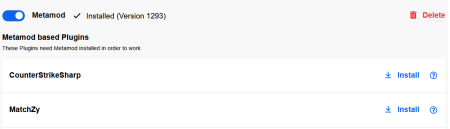
MatchZy requires Metamod. Install Metamod first in the webinterface, then activate CounterStrikeSharp and MatchZy.
Note: MatchZy is preinstalled on all our CS2 gameservers.


MatchZy Options
You can customize settings in the webpanel.

Knife Round Every player is admin Smoke Color Playout Prac / Tactic mode Damage Output Auto Record Autoteleport to Smoke Deathmatch during Warmup
Become Admin
You can become a MatchZy admin by adding yourself in the CKRAS BOT section of your panel.

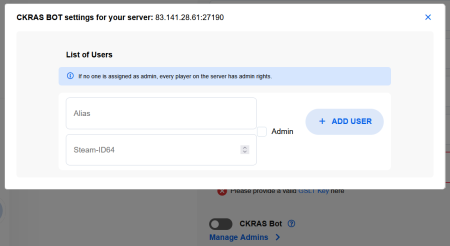
Note: The admin.json can also be edited manually via FTP if needed: /csgo/addons/counterstrikesharp/configs/admins.json
Advanced Configuration
/csgo/cfg/MatchZyContains warmup.cfg, knife.cfg, live.cfg, deathmatch.cfg and prac.cfg.
/csgo/cfg/MatchZy/whitelist.cfgAdd one SteamID64 per line to restrict access.
/csgo/addons/counterstrikesharp/configs/core.jsonChange the global plugin language (DE, EN, FR, etc.).
Support and Recovery
Restore the current round with !stop. Admins use !restore <round>.
bind "KEY" "say !rethrow"bind "KEY" "say !clear"Support: support@ckras.com Join Discord
PreFire | Retakes | Deathmatch
