CKRAS BOT: Difference between revisions
No edit summary |
No edit summary |
||
| (47 intermediate revisions by the same user not shown) | |||
| Line 1: | Line 1: | ||
__NOTOC__ | |||
{{#seo: | {{#seo: | ||
|title=Easy management of your CS2 server - CKRAS WIKI | |title=Easy management of your CS2 server - CKRAS WIKI | ||
|title_mode=append | |title_mode=append | ||
|keywords=ckras, wiki, cs2, gameserver, help, guide, csgo, webinterface, token, gslt, area, ckras bot, bot, manage | |keywords=ckras, wiki, cs2, gameserver, help, guide, csgo, webinterface, token, gslt, area, ckras bot, bot, manage, scrim, prac, coach, matchzy | ||
|description=CKRAS BOT | |description=CKRAS BOT helps you manage your CS2 gameserver with simple in-game commands. Start scrims, practice sessions, coaches, demos and more directly on your CKRAS server. | ||
|image= | |image=Counterstrike2.png | ||
|image_alt=CKRAS BOT for CS2 Gameserver | |image_alt=CKRAS BOT for CS2 Gameserver | ||
}} | }} | ||
<div class="ck-page"> | |||
<div class="ck-hero--dark"> | |||
{| style="background:transparent; border:none; width:100%;" | |||
|- | |||
| style="vertical-align:top; width:130px; padding-right:20px;" | | |||
<div class="ck-hero-logo">[[File:CKRAS BOT .png|alt=CKRAS BOT for CS2 Server|110x110px]]</div> | |||
| style="vertical-align:top;" | | |||
<div class="ck-hero-content"> | |||
<h1 class="ck-hero-title">CKRAS BOT</h1> | |||
<div class="ck-hero-sub">Manage your CS2 server with simple in-game commands for practice, scrims, matches, coaches and demos.</div> | |||
<div class="ck-hero-meta"><b>Quick Start:</b> Type <code>!help</code> in-game to see all available commands.</div> | |||
<div class="ck-hero-actions"> | |||
[https://iface.ckras.com <span class="ck-btn ck-btn-primary">▶ Open Webpanel</span>] | |||
[https://www.ckras.com/en/ <span class="ck-btn ck-btn-ghost">CKRAS Website</span>] | |||
[https://play.ckras.com <span class="ck-btn ck-btn-ghost">Play</span>] | |||
</div> | |||
</div> | |||
|} | |||
</div> | |||
<div class="ck-lead"> | |||
'''CKRAS BOT''' helps you manage your '''[[CS2]] gameserver''' with simple chat commands. | |||
Start '''practice''', '''scrims''', '''Bo1 / Bo3 / Bo5 matches''', use '''[[Coach]]''', control '''[[CSTV]]''', and combine everything with '''[[MatchZy]]''' for extended features. | |||
</div> | |||
<div class="ck-jump"> | |||
<b>Jump to:</b> [[CKRAS BOT#Quick Start|Quick Start]] • [[CKRAS BOT#Commands|Commands]] • [[CKRAS BOT#Installation|Installation]] • [[CKRAS BOT#Add Admin|Add Admin]] • [[CKRAS BOT#Disable CKRAS BOT|Disable BOT]] • [[CKRAS BOT#Video|Video]] | |||
</div> | |||
== Quick Start == | |||
<div class="ck-callout ck-callout--ok"> | |||
<b>Start using CKRAS BOT in seconds:</b> | |||
</div> | |||
# Join your server | |||
# Open chat | |||
# Type <code>!help</code> | |||
# Choose the mode you want to run | |||
# Start playing | |||
<div class="ck-callout ck-callout--amber"> | |||
<b>Recommended:</b> Activate [[MatchZy]] together with CKRAS BOT to unlock commands like <code>!spawns</code>, <code>!nades</code>, <code>!clear</code>, <code>!ff</code> and more. | |||
</div> | |||
{{info|>> [[MatchZy]] <<}} | |||
== Why CKRAS BOT == | |||
With CKRAS BOT you can control the most important parts of your CS2 server without editing configs manually. | |||
It is designed for easy usage directly in-game, so even new players can start a practice or scrim quickly. | |||
<div class="ck-feature-list"> | |||
<span class="ck-feature-pill">Practice Mode</span> | |||
<span class="ck-feature-pill">Scrims</span> | |||
<span class="ck-feature-pill">Bo1 / Bo3 / Bo5</span> | |||
<span class="ck-feature-pill">Coach Mode</span> | |||
<span class="ck-feature-pill">CSTV Demos</span> | |||
<span class="ck-feature-pill">Workshop Support</span> | |||
<span class="ck-feature-pill">Admin Management</span> | |||
<span class="ck-feature-pill">MatchZy Integration</span> | |||
</div> | |||
<div class="ck-callout"> | |||
<b>Tool version:</b> CS2 BOT (Prac/Scrim) Tool Version 1.03 — Released 25 April 2025 | |||
</div> | |||
== Installation == | |||
CKRAS BOT is included for all [[CS2]] customers and is available by default on supported servers. | |||
<div class="ck-callout ck-callout--amber"> | |||
<b>Note:</b> If you do not want to use CKRAS BOT, you can disable it in the [[Webinterface|webpanel]]. | |||
</div> | |||
<div class="ck-step-grid"> | |||
<div class="ck-step-card"> | |||
<div class="ck-step-top"> | |||
<div class="ck-step-num">1</div> | |||
<div class="ck-step-title">Open Webpanel</div> | |||
</div> | |||
<div class="ck-step-desc">Go to the CKRAS webpanel for your server management.</div> | |||
</div> | |||
<div class="ck-step-card"> | |||
<div class="ck-step-top"> | |||
<div class="ck-step-num">2</div> | |||
<div class="ck-step-title">Check CKRAS BOT</div> | |||
</div> | |||
<div class="ck-step-desc">CKRAS BOT is already available by default for CS2 customers.</div> | |||
</div> | |||
<div class="ck-step-card"> | |||
<div class="ck-step-top"> | |||
<div class="ck-step-num">3</div> | |||
<div class="ck-step-title">Use In-Game Commands</div> | |||
</div> | |||
<div class="ck-step-desc">Join your server and type <code>!help</code> to get started.</div> | |||
</div> | |||
</div> | |||
= | [[File:Activate-ckras-bot.png|alt=Activate CKRAS BOT]] | ||
CKRAS BOT | |||
= | <div class="ck-callout"> | ||
<b>New webpanel:</b> https://iface.ckras.com | |||
</div> | |||
== Commands == | == Commands == | ||
<div class="ck-lead"> | |||
These are the most important commands to control your server with CKRAS BOT. | |||
</div> | |||
<div class="ck-command-nav"> | |||
[[CKRAS BOT#Admin Commands|Admin Commands]] • [[CKRAS BOT#Public Commands|Public Commands]] • [[CKRAS BOT#Features available with Addons .28MatchZy.29|Addon Commands]] | |||
</div> | |||
=== Admin Commands === | === Admin Commands === | ||
{| class="wikitable" width=" | |||
| | <div class="ck-callout ck-callout--amber"> | ||
<b>Admin required.</b> These commands are restricted once BOT admins are assigned. | |||
</div> | |||
{| class="wikitable" | |||
|- | |||
! style="width:220px;" | Command | |||
! style="width:580px;" | Description | |||
|- | |||
| <code>!help</code> || Lists all available commands. | |||
|- | |||
| <code>!map</code> || Switches to the desired map, for example <code>!map dust2</code> or <code>!map de_dust2</code>. | |||
|- | |- | ||
! | | <code>!rr</code> / <code>!restart</code> || Restarts the server after a few seconds. | ||
|- | |- | ||
|! | | <code>!5on5</code> / <code>!bo1</code> / <code>!startmatch</code> || Loads a 5on5 setup and restarts the game. | ||
|- | |- | ||
|! | | <code>!scrim</code> || Activates scrim mode and enables commands like <code>!coach</code>. | ||
|- | |- | ||
|! | | <code>!rcon <command></code> || Executes an RCON command, for example <code>!rcon say test</code>. | ||
|- | |- | ||
|! | | <code>!train</code> / <code>!training</code> / <code>!prac</code> || Starts training / practice mode. | ||
|- | |- | ||
|! | | <code>!clinch</code> || Ends a <code>!5on5</code> once the winner is determined. | ||
| | |||
|- | |- | ||
| | | <code>!playout</code> || Toggles playout mode so all rounds are played. | ||
| | |||
|- | |- | ||
| <code>!impact</code> || Shows damage caused in practice mode. | |||
|< | |||
|- | |- | ||
|! | | <code>!stopimpact</code> || Stops the damage display. | ||
| | |||
|- | |- | ||
|! | | <code>!rethrow</code> || Rethrows the last thrown smoke, flash, HE or molotov in training mode. | ||
| | |||
|- | |- | ||
|! | | <code>!stop</code> || Ends <code>!5on5</code>, <code>!train</code> or <code>!scrim</code>. | ||
|< | |||
|- | |- | ||
| <code>!record</code> || Starts a demo on your [[CSTV]] server. | |||
|< | |||
|- | |- | ||
|! | | <code>!tvstop</code> || Stops the CSTV demo recording. | ||
| | |||
|- | |- | ||
|! | | <code>!config <name></code> || Loads a custom config, for example <code>!config train</code>. | ||
| | |||
|- | |- | ||
|! | | <code>!knife</code> || Activates knife round mode, then use <code>!swap</code> or <code>!stay</code>. | ||
| | |||
|- | |- | ||
|! | | <code>!botadd</code> / <code>!addbot</code> || Adds bots to the server. | ||
| | |||
|- | |- | ||
|! | | <code>!overtime</code> || Enables overtime in 5on5 mode. | ||
| | |||
|- | |- | ||
|! | | <code>!restore</code> || Restores a backup of the selected round, for example <code>!restore 5</code>. | ||
|< | |||
|- | |- | ||
|! | | <code>!restorelast</code> || Restores the last round backup. | ||
| | |||
|- | |- | ||
|< | | <code>!workshop</code> || Lists workshop commands. | ||
| | |||
|- | |- | ||
|! | | <code>!winstall <number></code> || Installs a workshop map by Workshop ID. | ||
| | |||
|- | |- | ||
|! | | <code>!wlist</code> || Lists installed workshop maps. | ||
| | |||
|- | |- | ||
|! | | <code>!wmap <mapname></code> || Changes to an installed workshop map. | ||
| | |||
|} | |} | ||
<div class="ck-callout"> | |||
If no BOT admin has been assigned, every player on the server can use admin commands. | |||
</div> | |||
=== Public Commands === | |||
{| class="wikitable" | |||
{| class="wikitable" | |||
|- | |- | ||
! | ! style="width:220px;" | Command | ||
! style="width:580px;" | Description | |||
|- | |- | ||
|!help||Lists all available commands | | <code>!help</code> || Lists all available commands. | ||
|- | |- | ||
| | | <code>!coach <ct|t></code> || Activates coach mode for the selected side. Requires [[MatchZy]]. | ||
|Activates the | |||
|- | |- | ||
|!uncoach | | <code>!uncoach</code> || Exits coach mode. | ||
|Exits | |||
|- | |- | ||
|!nade | | <code>!nade</code> / <code>!nades</code> || Opens the grenade menu. Requires [[MatchZy]]. | ||
| | |||
|- | |- | ||
|!pause||Pauses the game in the next | | <code>!pause</code> || Pauses the game in the next freeze time. | ||
|- | |- | ||
|!unpause|| | | <code>!unpause</code> || Requests the game to continue. | ||
|- | |- | ||
|!swap | | <code>!swap</code> || Swaps teams after a knife round. | ||
|- | |- | ||
|!stay | | <code>!stay</code> || Keeps the current side after winning knife round. | ||
| | |||
|- | |- | ||
|!timeout | | <code>!timeout</code> / <code>!tactics</code> || Starts a tactical timeout in 5on5 mode. | ||
| | |||
|- | |- | ||
|!nobot | | <code>!nobot</code> || Removes bots from the server. | ||
|Removes | |||
|- | |- | ||
|!report < | | <code>!report <bug></code> || Sends a bug report or feature request. | ||
| | |||
|} | |} | ||
=== Features available with Addons === | === Features available with Addons ([[MatchZy]]) === | ||
<div class="ck-callout ck-callout--ok"> | |||
<b>Recommended addon:</b> [[MatchZy]] adds many advanced commands for pracs, grenades, coaches and scrims. | |||
</div> | |||
{| class="wikitable" | |||
{| class="wikitable" width=" | |- | ||
|!prefire | ! style="width:220px;" | Command | ||
| | ! style="width:580px;" | Description | ||
|- | |||
| <code>!prefire</code> || Starts [[PreFire]] training if the addon is installed. | |||
|- | |- | ||
|!spawns < | | <code>!spawns</code> || Shows competitive spawns. | ||
| | |||
|- | |- | ||
|!ready !unready | | <code>!ready</code> / <code>!unready</code> || Used for ready systems in match mode. | ||
| | |||
|- | |- | ||
|!start | | <code>!start</code> || Forces a game to start immediately. | ||
| | |||
|- | |- | ||
| | | <code>!clear</code> || Clears active grenades on the server. | ||
| | |||
|- | |- | ||
|!break | | <code>!break</code> || Breaks breakable map entities. | ||
| | |||
|- | |- | ||
|!watchme | | <code>!watchme</code> || Forces all players into spectator except the current player. | ||
| | |||
|- | |- | ||
|!noflash | | <code>!noflash</code> || Toggles flashbang immunity. | ||
| | |||
|- | |- | ||
|!fastforward | | <code>!fastforward</code> || Fast-forwards server time. | ||
| | |||
|- | |- | ||
|!rethrow | | <code>!rethrow</code> || Rethrows the last grenade. | ||
| | |||
|- | |- | ||
|!last | | <code>!last</code> || Teleports to the last thrown grenade position. | ||
| | |||
|- | |- | ||
|!timer | | <code>!timer</code> || Starts or stops a timer. | ||
| | |||
|- | |- | ||
|!back < | | <code>!back <number></code> || Teleports back to a saved grenade history position. | ||
| | |||
|- | |- | ||
|!throwindex | | <code>!throwindex <index></code> || Throws grenade(s) from history. | ||
| | |||
|- | |- | ||
|!delay < | | <code>!delay <seconds></code> || Sets delay for rethrow or throwindex. | ||
| | |||
|- | |- | ||
|!lastindex | | <code>!lastindex</code> || Prints the index number of the last grenade. | ||
| | |||
|- | |- | ||
|!rethrowsmoke | | <code>!rethrowsmoke</code>, <code>!rethrownade</code>, <code>!rethrowflash</code>, <code>!rethrowmolotov</code>, <code>!rethrowdecoy</code> || Grenade-specific rethrow commands. | ||
< | |||
< | |||
< | |||
< | |||
| | |||
|- | |- | ||
| | | <code>!nade</code> || Opens the advanced nade menu with save and load features. | ||
. | |||
|} | |} | ||
< | <div class="ck-callout"> | ||
For the full MatchZy command list, see [[MatchZy]]. | |||
</div> | |||
== Coach Mode == | |||
<div class="ck-callout"> | |||
<b>Command:</b> <code>!coach <ct|t></code> | |||
</div> | |||
[[File:Whistle.png|left|20x20px|Coach|link=https://wiki-en.ckras.com/wiki/index.php?title=Coach]] | |||
Coach mode lets you assign yourself as coach for CT or T side. | |||
<div class="ck-callout ck-callout--amber"> | |||
<b>Requirement:</b> Install [[MatchZy]] and Metamod to use coach features. | |||
</div> | |||
< | <div style="clear:both;"></div> | ||
== Add Admin == | == Add Admin == | ||
You can manage BOT admins in the webpanel. | |||
<div class="ck-callout ck-callout--amber"> | |||
<b>Important:</b> If no admin is assigned, every player on the server has admin rights. | |||
</div> | |||
<div class="ck-step-grid"> | |||
<div class="ck-step-card"> | |||
<div class="ck-step-top"> | |||
<div class="ck-step-num">1</div> | |||
<div class="ck-step-title">Open Admin Management</div> | |||
</div> | |||
<div class="ck-step-desc">Open the CKRAS BOT section in the webpanel and click <b>Manage Admins</b>.</div> | |||
</div> | |||
<div class="ck-step-card"> | |||
<div class="ck-step-top"> | |||
<div class="ck-step-num">2</div> | |||
<div class="ck-step-title">Add SteamID64</div> | |||
</div> | |||
<div class="ck-step-desc">Enter your SteamID64 so only selected admins can manage the server.</div> | |||
</div> | |||
<div class="ck-step-card"> | |||
<div class="ck-step-top"> | |||
<div class="ck-step-num">3</div> | |||
<div class="ck-step-title">Restart Server</div> | |||
</div> | |||
<div class="ck-step-desc">Restart the server once after adding the admin entry.</div> | |||
</div> | |||
</div> | |||
[[File:Add-admins.png|alt=ADD ADMIN (CKRAS BOT)|750x750px]] | |||
=== Find your Steam ID3 or Steam ID64 === | === Find your Steam ID3 or Steam ID64 === | ||
You can find your SteamID3 in the console log or your SteamID64 in your Steam profile settings. | |||
== | [[File:Console-log-button.png|alt=Console|link=]] | ||
[[File:Findsteam-id.png|alt=Find your Steam ID 3|750x750px|link=]] | |||
<div class="ck-callout"> | |||
<b>Note:</b> Please use <b>SteamID64</b>. SteamID3 is no longer recommended. | |||
</div> | |||
=== Add Admin in Webpanel === | |||
[[File:Add-admins.png|alt=CKRAS BOT ADMIN - EDIT|750x750px]] | |||
[[File:Add-user-webpanel-bot-admin.png|alt=CKRAS BOT ADMIN ASSIGN|750x750px]] | |||
[[File:Add-user-admin-2.png|alt=MANAGE ADMIN RIGHTS - CKRAS BOT|750x750px]] | |||
[[File:Add-user-admin-3.png|alt=MANAGE ADMIN RIGHTS - CKRAS BOT|750x750px]] | |||
== Workshop Support == | |||
CKRAS BOT also supports workshop maps. | |||
<div class="ck-feature-list"> | |||
<span class="ck-feature-pill"><code>!workshop</code></span> | |||
<span class="ck-feature-pill"><code>!winstall</code></span> | |||
<span class="ck-feature-pill"><code>!wlist</code></span> | |||
<span class="ck-feature-pill"><code>!wmap</code></span> | |||
</div> | |||
See the full [[Workshop|Workshop Guide]] for details. | |||
== | == In-Game Screenshots == | ||
<div class="ck-lead"> | |||
This is how CKRAS BOT looks in-game on your [[CS2]] server. | |||
</div> | |||
[[File:CKRAS BOT (prac) Beta.png|alt=CKRAS BOT (prac) Beta|500x500px|link=]] | |||
[[File:CKRAS-BOT-Beta06.png|alt=CKRAS BOT Beta (scrim/prac) Version 06|500x500px|link=]] | |||
[[File:CKRAS BOT-07112023.png|alt=CKRAS BOT-07112023|link=]] | |||
== Disable CKRAS BOT == | |||
You can disable CKRAS BOT in the webpanel if you do not want to use it. | |||
[[File:Disable-ckras-bot.png|alt=Disable CKRAS BOT|624x624px]] | |||
== Video == | |||
https://www.youtube.com/watch?v=vrkp0EdQoHQ | |||
Short video showing how CKRAS BOT works. | |||
Some functions are available only with the BOT itself, while others require addons like [[MatchZy]] or related scrim tools. | |||
== Notes == | |||
The basic functions of CKRAS BOT are already complete. | |||
Additional features are being expanded step by step through deeper addon integration such as [[MatchZy]]. | |||
= | <div class="ck-callout"> | ||
If you want other plugins integrated into CKRAS BOT or the webpanel, contact the CKRAS team. | |||
</div> | |||
{{bot|1=CKRAS BOT}} | |||
== | == Feedback == | ||
Please send feedback to '''support@ckras.com'''. | |||
You can also report issues directly with: | |||
<code>!report "PROBLEM"</code> | |||
== Gameserver == | == Gameserver == | ||
| Line 324: | Line 404: | ||
'''Get your own CS2 Gameserver with CKRAS BOT at [https://www.ckras.com/en/ www.ckras.com - Order]''' | '''Get your own CS2 Gameserver with CKRAS BOT at [https://www.ckras.com/en/ www.ckras.com - Order]''' | ||
[[index.php?title=Category:CS2]] | |||
</div> | |||
Latest revision as of 11:25, 24 March 2026
 |
CKRAS BOTManage your CS2 server with simple in-game commands for practice, scrims, matches, coaches and demos.
|
CKRAS BOT helps you manage your CS2 gameserver with simple chat commands. Start practice, scrims, Bo1 / Bo3 / Bo5 matches, use Coach, control CSTV, and combine everything with MatchZy for extended features.
Jump to: Quick Start • Commands • Installation • Add Admin • Disable BOT • Video
Quick Start
Start using CKRAS BOT in seconds:
- Join your server
- Open chat
- Type
!help - Choose the mode you want to run
- Start playing
Recommended: Activate MatchZy together with CKRAS BOT to unlock commands like !spawns, !nades, !clear, !ff and more.
|
|
>> MatchZy << |

Why CKRAS BOT
With CKRAS BOT you can control the most important parts of your CS2 server without editing configs manually. It is designed for easy usage directly in-game, so even new players can start a practice or scrim quickly.
Practice Mode Scrims Bo1 / Bo3 / Bo5 Coach Mode CSTV Demos Workshop Support Admin Management MatchZy Integration
Tool version: CS2 BOT (Prac/Scrim) Tool Version 1.03 — Released 25 April 2025
Installation
CKRAS BOT is included for all CS2 customers and is available by default on supported servers.
Note: If you do not want to use CKRAS BOT, you can disable it in the webpanel.
!help to get started.
New webpanel: https://iface.ckras.com
Commands
These are the most important commands to control your server with CKRAS BOT.
Admin Commands
Admin required. These commands are restricted once BOT admins are assigned.
| Command | Description |
|---|---|
!help |
Lists all available commands. |
!map |
Switches to the desired map, for example !map dust2 or !map de_dust2.
|
!rr / !restart |
Restarts the server after a few seconds. |
!5on5 / !bo1 / !startmatch |
Loads a 5on5 setup and restarts the game. |
!scrim |
Activates scrim mode and enables commands like !coach.
|
!rcon <command> |
Executes an RCON command, for example !rcon say test.
|
!train / !training / !prac |
Starts training / practice mode. |
!clinch |
Ends a !5on5 once the winner is determined.
|
!playout |
Toggles playout mode so all rounds are played. |
!impact |
Shows damage caused in practice mode. |
!stopimpact |
Stops the damage display. |
!rethrow |
Rethrows the last thrown smoke, flash, HE or molotov in training mode. |
!stop |
Ends !5on5, !train or !scrim.
|
!record |
Starts a demo on your CSTV server. |
!tvstop |
Stops the CSTV demo recording. |
!config <name> |
Loads a custom config, for example !config train.
|
!knife |
Activates knife round mode, then use !swap or !stay.
|
!botadd / !addbot |
Adds bots to the server. |
!overtime |
Enables overtime in 5on5 mode. |
!restore |
Restores a backup of the selected round, for example !restore 5.
|
!restorelast |
Restores the last round backup. |
!workshop |
Lists workshop commands. |
!winstall <number> |
Installs a workshop map by Workshop ID. |
!wlist |
Lists installed workshop maps. |
!wmap <mapname> |
Changes to an installed workshop map. |
If no BOT admin has been assigned, every player on the server can use admin commands.
Public Commands
| Command | Description |
|---|---|
!help |
Lists all available commands. |
| t> | Activates coach mode for the selected side. Requires MatchZy. |
!uncoach |
Exits coach mode. |
!nade / !nades |
Opens the grenade menu. Requires MatchZy. |
!pause |
Pauses the game in the next freeze time. |
!unpause |
Requests the game to continue. |
!swap |
Swaps teams after a knife round. |
!stay |
Keeps the current side after winning knife round. |
!timeout / !tactics |
Starts a tactical timeout in 5on5 mode. |
!nobot |
Removes bots from the server. |
!report <bug> |
Sends a bug report or feature request. |
Features available with Addons (MatchZy)
Recommended addon: MatchZy adds many advanced commands for pracs, grenades, coaches and scrims.
| Command | Description |
|---|---|
!prefire |
Starts PreFire training if the addon is installed. |
!spawns |
Shows competitive spawns. |
!ready / !unready |
Used for ready systems in match mode. |
!start |
Forces a game to start immediately. |
!clear |
Clears active grenades on the server. |
!break |
Breaks breakable map entities. |
!watchme |
Forces all players into spectator except the current player. |
!noflash |
Toggles flashbang immunity. |
!fastforward |
Fast-forwards server time. |
!rethrow |
Rethrows the last grenade. |
!last |
Teleports to the last thrown grenade position. |
!timer |
Starts or stops a timer. |
!back <number> |
Teleports back to a saved grenade history position. |
!throwindex <index> |
Throws grenade(s) from history. |
!delay <seconds> |
Sets delay for rethrow or throwindex. |
!lastindex |
Prints the index number of the last grenade. |
!rethrowsmoke, !rethrownade, !rethrowflash, !rethrowmolotov, !rethrowdecoy |
Grenade-specific rethrow commands. |
!nade |
Opens the advanced nade menu with save and load features. |
For the full MatchZy command list, see MatchZy.
Coach Mode
Command: !coach <ct|t>

Coach mode lets you assign yourself as coach for CT or T side.
Requirement: Install MatchZy and Metamod to use coach features.
Add Admin
You can manage BOT admins in the webpanel.
Important: If no admin is assigned, every player on the server has admin rights.

Find your Steam ID3 or Steam ID64
You can find your SteamID3 in the console log or your SteamID64 in your Steam profile settings.

Note: Please use SteamID64. SteamID3 is no longer recommended.
Add Admin in Webpanel


Workshop Support
CKRAS BOT also supports workshop maps.
!workshop
!winstall
!wlist
!wmap
See the full Workshop Guide for details.
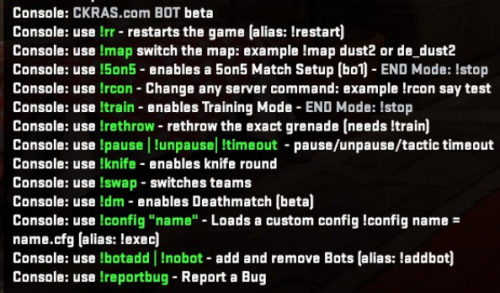
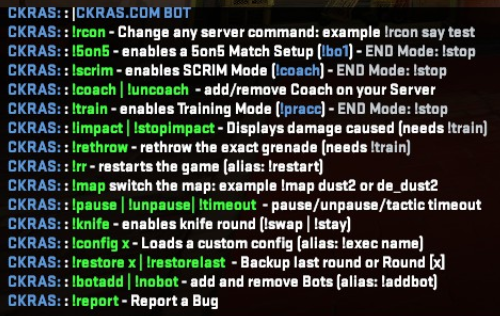
In-Game Screenshots
This is how CKRAS BOT looks in-game on your CS2 server.
Disable CKRAS BOT
You can disable CKRAS BOT in the webpanel if you do not want to use it.

Video
https://www.youtube.com/watch?v=vrkp0EdQoHQ
Short video showing how CKRAS BOT works. Some functions are available only with the BOT itself, while others require addons like MatchZy or related scrim tools.
Notes
The basic functions of CKRAS BOT are already complete. Additional features are being expanded step by step through deeper addon integration such as MatchZy.
If you want other plugins integrated into CKRAS BOT or the webpanel, contact the CKRAS team.

|
CKRAS BOT |
Feedback
Please send feedback to support@ckras.com.
You can also report issues directly with:
!report "PROBLEM"
Gameserver
Get your own CS2 Gameserver with CKRAS BOT at www.ckras.com - Order

_Beta.png)